


Taximeter - Meter App
4.7303.00 Reviews
App Specs
- Version
- 8.38.337.7
- Updated On
- License
- Free
- Downloads
- 1,000,000+
- Developer
- Meter App Inc.
- Categories
- Business
- Platform
- Android
Screenshots
 Analysis by AppCompare
Ever wondered how cab drivers keep a running fare in mind while also watching traffic, finding a pickup point, and listening to a passenger? I like the idea behind Taximeter - Meter App because it turns one recurring bit of mental bookkeeping into something a phone can handle. It is a business app from Meter App Inc., aimed at tracking a journey and calculating a fare rather than replacing every part of a driver’s workday. That distinction matters: it can reduce friction on a trip, but it is not a substitute for knowing the local rules or checking that the final fare makes sense.
The fare-tracking problem it is built to solve
A driver can spend a shift repeating the same small tasks: remember the starting charge, keep track of distance and time, account for a rate change, and explain the total at the end. A passenger may have the opposite concern and simply want a second estimate to compare with what the ride costs. A dedicated meter keeps those figures visible instead of leaving them to memory or a rough calculation.
That is where this app feels most useful to me. It is designed around a specific job—following a ride and showing a fare—so it is more direct than opening a spreadsheet or calculator each time. The app has a 4.6 average from around 16 thousand ratings and over a million installs, which suggests it has found an audience among people who want that focused tool. Those figures are context, not proof that its settings will automatically match every city’s fare rules.
A sensible first setup makes later trips easier
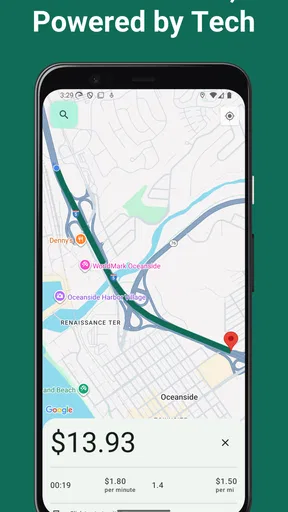
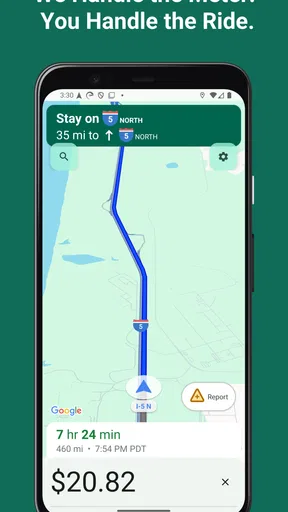
The first thing that struck me about the Taximeter - Meter App was its simplicity. Setting it up was a breeze, and within minutes, I was ready to hit the road. The app uses GPS to track your journey, ensuring that every twist and turn is accounted for in the fare calculation. No more guesswork—just precise numbers that reflect your actual travel distance.
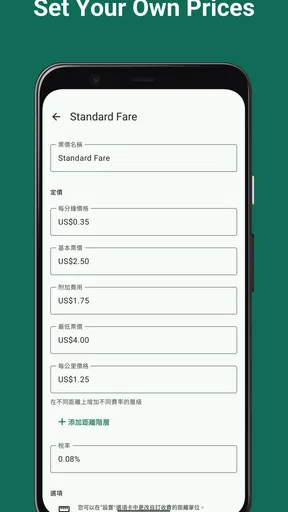
One cool feature is the ability to customize rates. Whether you're in a city with standard fares or need to adjust for late-night surcharges, this app lets you tweak the rates to match local regulations or personal preferences. It's like having a digital taximeter right in your pocket!
In practice, I would treat the first setup as a calibration task, not a one-time formality. Check the rate components against the rules that apply where you drive, then take a short test trip and compare the result with a calculation you can verify. That quick check helps catch a misplaced decimal, the wrong distance unit, or an overlooked time-based charge before it affects a real fare. If you work in more than one area, review the settings when you change locations instead of assuming the same rate structure applies everywhere.
GPS-based tracking also has a practical trade-off: a phone’s estimate depends on location reception and how the route is recorded. Tall buildings, underground sections, or a device tucked out of view may make tracking less dependable than it is on an open road. I would keep the phone positioned where it can receive a clear signal, and I would avoid treating an automated reading as the final authority when a local meter rule requires something different.
Worth Reading Before You Choose

EA SPORTS FC Mobile 26 Is a Bigger Football Game, but It Takes Time

Flipboard Shows What News Apps Must Do Beyond the Feed

Switching to Android Auto Means Rethinking Your Driving Routine

Google Calendar Makes a Crowded Week Easier to Manage

Ludo King Makes the Most of the Minutes Between Plans

Baby Panda World Brings Quick Play to Modern Phones, but Its Game Library Feels Busy
Using the meter through a real working day
A working day is where a meter’s value becomes clearer: several fares can turn small interruptions into repeated mental arithmetic, while a running display and saved trip details give you something concrete to check later. I’d make the routine dependable by confirming the rate before the first pickup and reviewing a trip when safely stopped, rather than adjusting settings on the move. That practical rhythm also helps show where the app’s convenience ends and a more specialized system may be needed.
Intuitive Interface
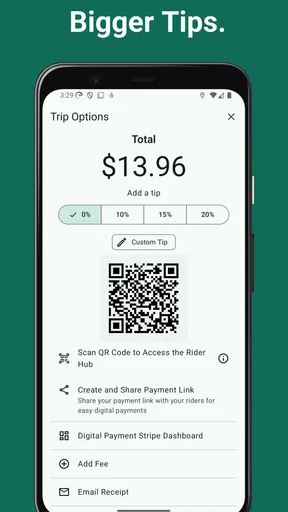
Now, let's talk about the interface. It's clean, straightforward, and doesn't leave you fumbling around trying to figure out what button does what. The large display shows key information like distance traveled, fare amount, and travel time. Plus, there's a handy feature to save trips for future reference, which is great for keeping track of expenses.
For those who like a bit of customization, you can choose different themes to match your mood or the interior of your ride. It's the small touches like this that make the app feel less like a tool and more like a companion on your journey.
That clear display is more than a cosmetic benefit when a driver is busy: it helps keep the important numbers together, so there is less reason to switch between apps or do mental arithmetic while stopped at a light. Still, I would set everything up before moving and keep interaction to a minimum during a ride. A fare tool should reduce distraction, not invite a driver to explore themes or settings in traffic.
Perfect for Drivers and Passengers Alike
Whether you're a professional driver or just someone who likes to keep an eye on their fares, this app is versatile. Drivers can rely on its accuracy to ensure they're charging the correct amount, while passengers can use it to double-check fares and avoid any "creative" calculations.
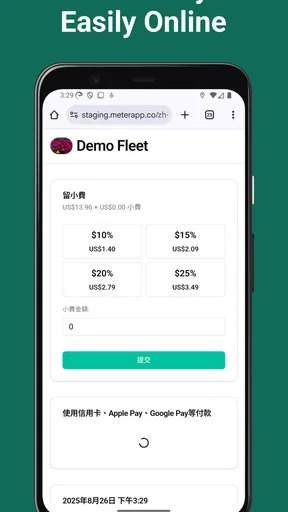
There's also an option for logging income and expenses, making it a handy tool for financial management. You can easily track your earnings, see patterns over time, and even export the data for further analysis.
Picture a driver starting an evening shift in a familiar neighborhood, with several short pickups and a longer trip across town. Instead of trying to remember each fare later, they can use the meter during each ride and save the trip for review. At the end of the shift, the records can help them compare the day’s work with their own notes. That is a modest but useful workflow: the app can make information easier to gather, while the driver still needs a separate routine for checking totals and keeping any records required for work.
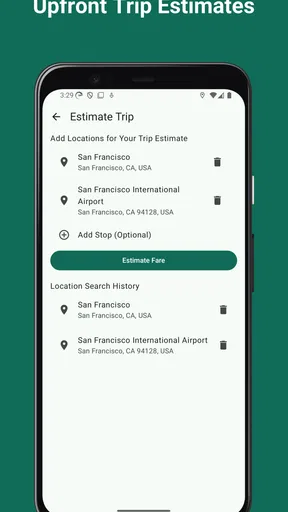
For a passenger, I see a narrower but reasonable use. You could compare the meter’s estimate with the fare being discussed, especially if you already understand the local pricing structure. It is not a guarantee that two calculations will match: route choice, waiting time, surcharges, and local rules can all affect the total. I would use it as a reference for transparency, not as an argument-winning device or a replacement for the official fare process.
Compared with a basic calculator, the advantage is that a trip-focused meter can combine journey tracking with a running fare instead of asking you to enter every change by hand. A spreadsheet can be better for detailed bookkeeping and custom reports, while a local licensed meter or dispatch system may be the necessary choice for professional compliance. This app sits between those options: more purpose-built than a calculator, but not automatically a full business-management system.
Useful adjustments, with a little care
To maximize your experience, I recommend exploring the settings thoroughly. You can adjust everything from distance units (miles or kilometers) to currency, ensuring the app aligns with your specific needs. And if you're traveling abroad, the currency conversion feature is a lifesaver!
The app also supports multiple languages, making it accessible to a global audience. Whether you're in the bustling streets of New York or cruising through the serene lanes of Kyoto, the app speaks your language—literally.
When using the app outside your usual area, I would change only what you have checked: units, currency, and the rate structure that applies to that ride. A currency display is helpful for reading a fare in familiar terms, but it should not be confused with changing the fare itself or satisfying local regulations. A practical habit is to note the settings you use for each operating area so you can restore them when you return, rather than rebuilding the setup from memory.
Saved trips and income-and-expense logging can also be more useful if you decide in advance what you want to learn from them. For example, reviewing several workdays may help you spot a mismatch between trip records and your own cash notes. That does not make the app a complete accounting package, so I would export or copy information into the bookkeeping method you already trust if you need formal records. The key benefit is having trip details available to check, not assuming a meter alone handles every financial task.
The app is free to download, though it includes in-app purchases ranging from $0.99 to $74.99 per item. I would check the purchase details in the app before paying for anything and decide whether the available free use already covers your routine. It is listed for everyone and has been available since December 8, 2014; version 8.38.190 requires Android 9 or later. Those details make it easier to judge compatibility, especially if you plan to use an older phone as a dedicated in-car device.
Where it fits—and where I would choose something else
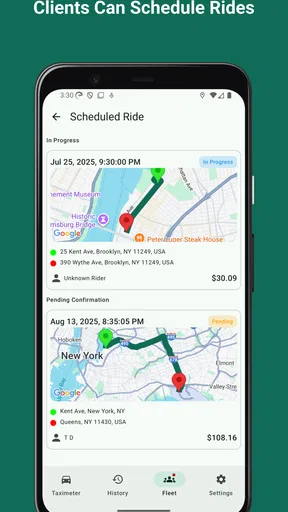
The strongest fit is an independent driver who wants a straightforward way to follow a fare and keep trip information in one place, or a passenger who wants a practical estimate to support a conversation. It may also suit someone who occasionally needs a meter-style calculation without investing in a more involved dispatch or accounting setup.
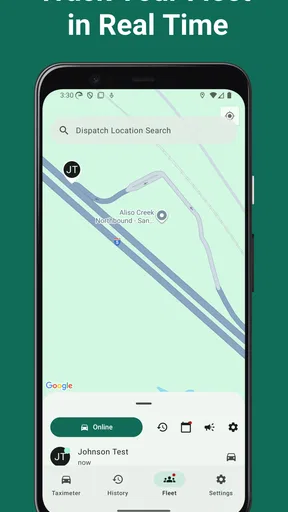
I would skip it as the primary tool if your work depends on a certified local meter, a fleet’s dispatch workflow, or strict integration with business records. I would also avoid relying on GPS-only estimates in places where reception is consistently poor or where the fare must be calculated by a prescribed device. In those situations, an official meter or a locally approved system is the safer choice, with this app at most serving as a secondary reference.
There is also a small but important human limitation: a phone is still a phone. Battery level, mounting position, incoming interruptions, and the temptation to adjust settings at the wrong moment can all affect a working tool. I would start a shift with enough charge, set the relevant rates before accepting a ride, and avoid making a passenger-facing promise based solely on a preliminary display. A clear fare estimate is helpful; a careful driver remains responsible for explaining the charge.
My verdict after looking at the everyday trade-offs
In conclusion, the Taximeter - Meter App is a fantastic tool for anyone looking to add transparency and accuracy to their travels. Its user-friendly design, customization options, and reliable functionality make it a standout choice in the realm of fare calculation apps.
Whether you're managing a fleet of taxis or simply want to ensure you're not overpaying on your next cab ride, this app is a worthy download. So, go ahead and give it a whirl—you might just find it's the travel companion you never knew you needed!
My recommendation is more specific: try it if you want a visible running fare, flexible rate settings, and trip records without turning a simple ride into a spreadsheet exercise. Take a few minutes to verify the setup in your area, then judge the result against a known trip before depending on it at work. If you need formal compliance, dispatch tools, or guaranteed accuracy in difficult GPS conditions, use the appropriate local system instead. For everyone else, it can remove a repetitive calculation from the day and make fare discussions easier to follow, as long as you treat it as a useful aid rather than an unquestionable authority.
Pros
- Accurate GPS tracking for precise fare calculation.
- User-friendly interface with intuitive controls.
- Supports multiple currencies and languages.
- Customizable rate settings for flexibility.
- Offline mode available for areas with poor signal.
Cons
- Limited customer support options available.
- Some features locked behind a paywall.
- Occasional GPS signal loss in dense areas.
- Drains battery quickly during extended use.
- Ads can be intrusive during navigation.
FAQs for Taximeter - Meter App
What is the primary function of the Taximeter - Meter App?
The Taximeter - Meter App is designed to accurately calculate fares for taxi or rideshare services. It uses GPS tracking to measure distance and time, ensuring that passengers and drivers have a transparent and reliable method for fare estimation. The app also provides features like trip logs and fare customization.
Is the Taximeter - Meter App compatible with both Android and iOS devices?
Yes, the Taximeter - Meter App is available for both Android and iOS platforms. It can be downloaded from the Google Play Store and Apple App Store, ensuring that users across different devices can access its features seamlessly and enjoy a consistent experience.
How user-friendly is the Taximeter - Meter App for new users?
The Taximeter - Meter App is designed with a user-friendly interface that appeals to both new and experienced users. It offers a straightforward setup process and intuitive navigation, making it easy for users to start tracking rides and calculating fares without a steep learning curve.
Does the Taximeter - Meter App require an internet connection to function?
While the app uses GPS, which can function without an active internet connection, some features like fare updates or trip logs may require internet access. It is recommended to have an internet connection for the most accurate and up-to-date fare calculations and feature functionality.
Are there any additional costs associated with using the Taximeter - Meter App?
The app might offer in-app purchases or a subscription model for premium features. It's advisable to review the app's pricing details in the app store description to understand any potential costs. However, basic fare calculation and tracking features are typically available for free.


